Connect MobileAction to Claude
You can connect your MobileAction account to Claude and work with your data in plain language. Once connected, Claude can pull live keyword rankings, downloads and revenue estimations, reviews, ad creatives, and Apple Ads campaign reports directly from MobileAction, then analyze them inside your conversation. No spreadsheet exports, no code.
This article covers connecting on claude.ai and the Claude desktop app. If you work in ChatGPT or Gemini, see the MobileAction MCP Server setup page instead.
Before you start
You will need:
- An active MobileAction API Solutions plan.
- Your MobileAction API key. Treat this key like a password.
- A Claude account. Custom connectors are available on all Claude plans.
WARNING
If your company uses a Claude Team or Enterprise plan, a Claude workspace Owner needs to add the connector for the organization first. The steps for Owners are the same as below, starting from Organization settings > Connectors. After the Owner adds it, each team member connects it for themselves.
Step 1: Add MobileAction as a connector
Open Claude and go to Settings > Connectors.
Click Add custom connector.
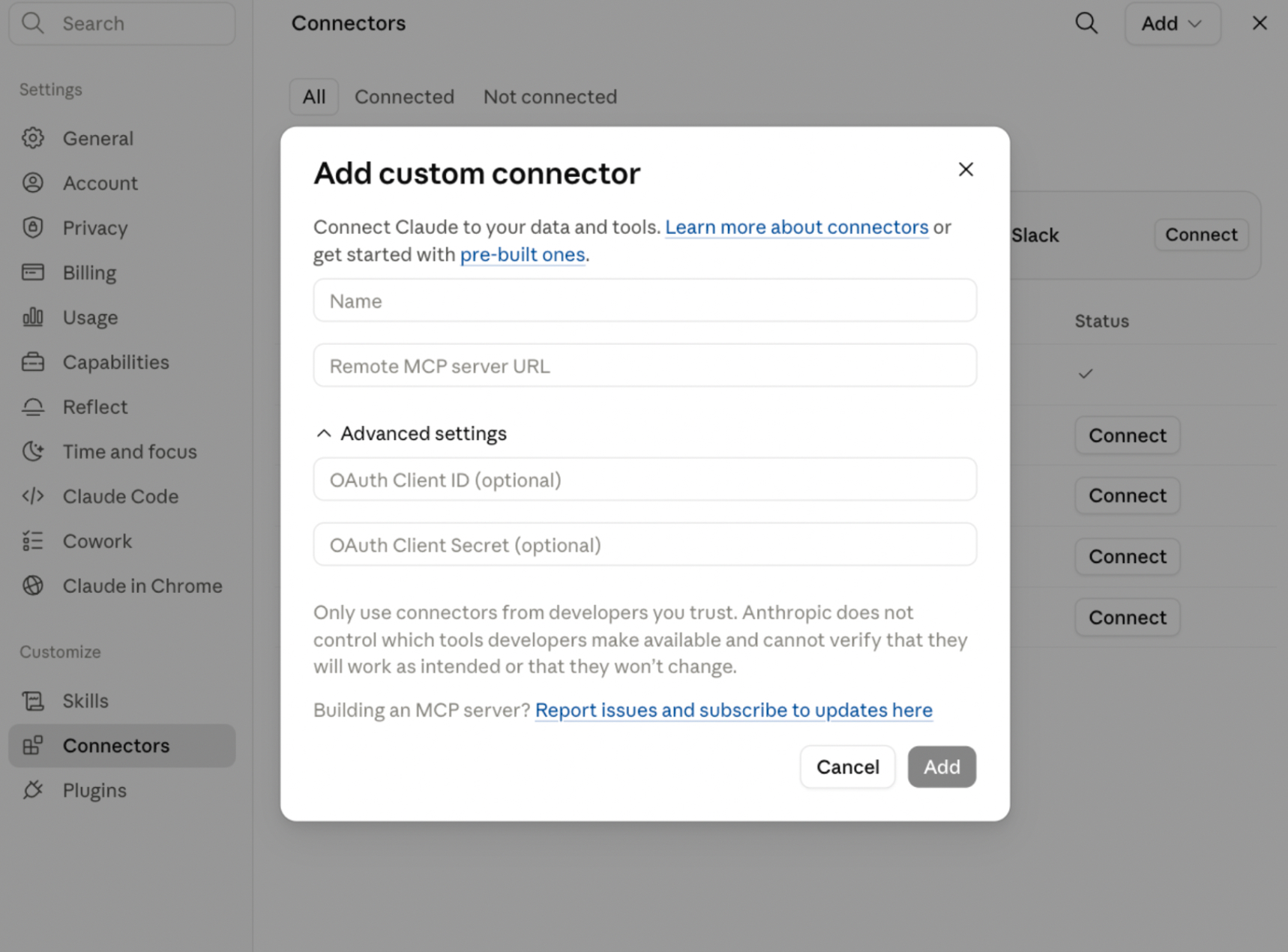
Fill in the fields:
- Name: MobileAction MCP Server
- URL: https://mcp.mobileaction.co/mcp?token=
YOUR-API-TOKEN
Replace YOUR-API-TOKEN with the token provided by your Customer Success Manager. The token is your authentication, so no extra sign-in step is needed.
- Click Add.
Claude connects to MobileAction from Anthropic's cloud, so there is nothing to install on your computer. The connection works the same on claude.ai, the desktop app, and mobile.
Step 2: Turn it on in a conversation
Start a new chat in Claude.
Click the
+button in the chat box and open Connectors.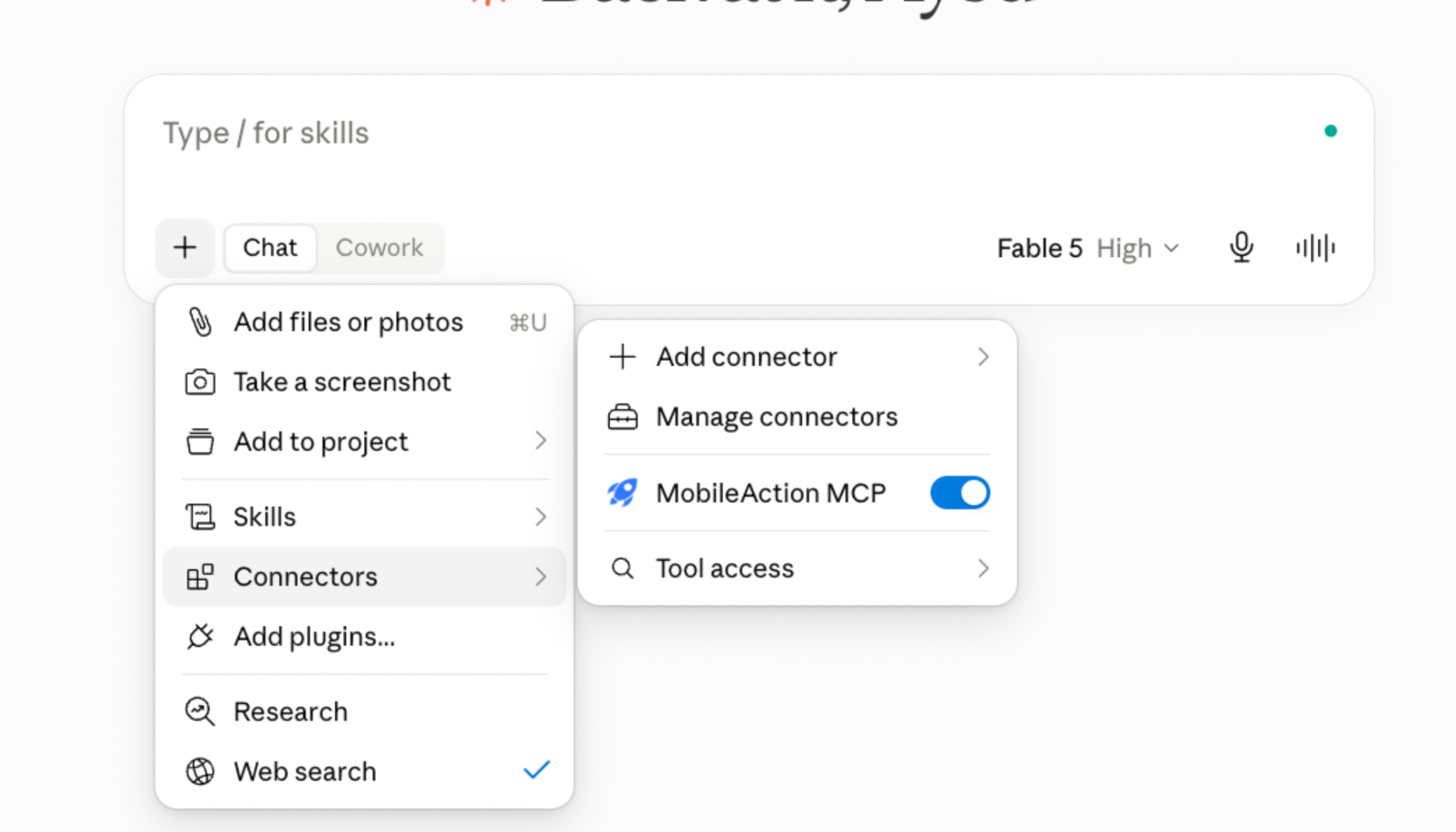
Toggle MobileAction on.
You only need to add the connector once. After that, it is available in any conversation where you switch it on.
Step 3: Ask your first question
Try prompts like these:
- "What are my top 20 keywords for [app name] in the US, and which ones moved this week?"
- "Pull download estimations for [competitor] over the last 90 days and compare them with ours."
- "Summarize the most common complaints in [app name]'s recent App Store reviews."
- "Which networks is [competitor] running the most video creatives on?"
- "Build me a weekly visibility summary I can paste into Slack."
Claude decides which MobileAction data to pull based on your question, retrieves it live, and works with it in the conversation. You can ask follow-up questions, request charts, or have Claude reshape the output for a report.
What Claude can and cannot do
Claude reads data from your MobileAction account. It reports what the data shows; interpretation and decisions stay with you. Claude does not change anything in your MobileAction account or your Apple Ads campaigns through this connection.
Troubleshooting
The connector shows as added, but Claude says it cannot reach MobileAction. Check that the token at the end of your connector URL is entered correctly and your API plan is active.
Claude answers from general knowledge instead of my data. Make sure the MobileAction connector is toggled on for that specific conversation via the + menu.
I hit a limit. Requests made through Claude draw from your API credit allowance. You can check remaining credits by asking Claude directly or in your dashboard.